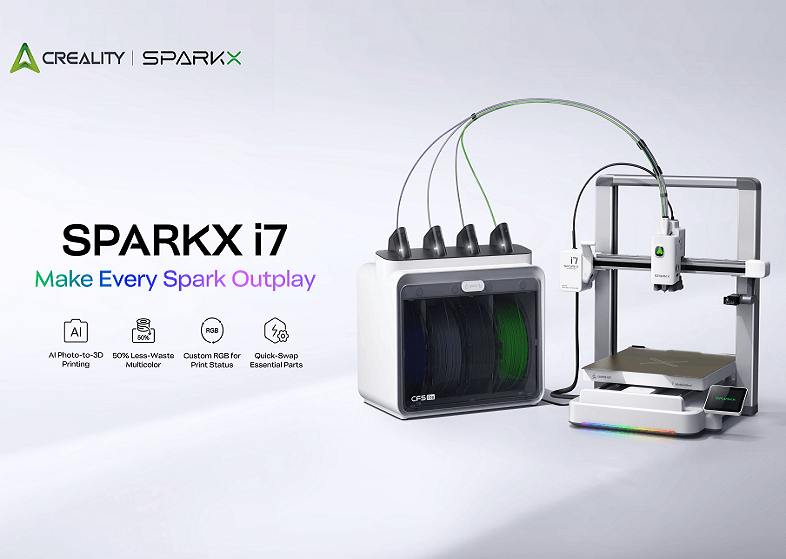
Creality SparkX i7 Review: Is CES 2026's Best-in-Show Worth Buying?
Research-based buying advice, not a hands-on test. Specifications, prices and availability can change. How we research and compare printers.
When Creality's SparkX i7 Color took home a Best of CES 2026 award, it turned heads across the 3D printing community. Creality — long known for budget-friendly but sometimes finicky machines — suddenly had a printer being mentioned alongside Bambu Lab for innovation.
But awards don't always translate to real-world performance. Let's dig into what the SparkX i7 actually offers, who it's built for, and whether it deserves a spot in your workspace.
What Makes the SparkX i7 Different?
The SparkX i7 Color represents Creality's push into smart, multi-color printing at an accessible price point. At $399, it's positioned squarely against other multi-color capable machines in the sub-$500 range.
Here's what stands out:
Smart Features That Actually Matter
The "i7" branding isn't just marketing — it references the printer's integrated intelligence features. The SparkX i7 includes automated calibration, AI-assisted print monitoring, and a streamlined setup process that Creality claims gets you printing within 15 minutes of unboxing.
For anyone who's spent hours leveling beds on older Creality machines, this is a significant shift. The printer handles first-layer calibration, flow rate adjustment, and vibration compensation automatically.
Multi-Color Without the Complexity
The SparkX i7 Color supports multi-color printing out of the box. While it doesn't match the 4-color capabilities of some higher-end systems, it gives beginners and hobbyists an entry point into color printing without requiring separate AMS units or complex filament routing.
Open Frame Design
With an open-frame build at 500mm/s speeds, the SparkX i7 is designed for PLA and PETG printing. If you're planning to print ABS or other high-temperature materials regularly, you'll want to look at enclosed alternatives.
SparkX i7 vs. The Competition at $399
The $399 price point is crowded in 2026. Here's how the SparkX i7 stacks up against direct competitors:
Creality SparkX i7 Color ($399) vs. Bambu Lab A1 ($399)
Both printers share the same price tag, but they take different approaches:
- Speed: Both max out at 500mm/s
- Build style: Both are open-frame bedslingers
- Multi-color: The SparkX i7 Color includes color capabilities built-in; the A1 requires the separate AMS Lite for multi-color
- Ecosystem: Bambu Lab's software and cloud integration remain more polished, but Creality has closed the gap significantly
The SparkX i7's integrated multi-color approach means fewer accessories to buy upfront. However, if you value Bambu Lab's refined slicer and app experience, the A1 remains the safer choice.
Creality SparkX i7 Color ($399) vs. Qidi Tech Q1 Pro ($399)
The Qidi Tech Q1 Pro offers something the SparkX i7 doesn't: a fully enclosed chamber with 600mm/s speeds.
If you need to print ABS, ASA, or other engineering materials, the Q1 Pro's enclosure makes it the better pick. But if you're focused on PLA and PETG with multi-color capabilities, the SparkX i7 offers more creative flexibility.
Creality SparkX i7 Color ($399) vs. Elegoo Centauri Carbon 2 ($399)
Elegoo's Centauri Carbon 2 brings an enclosed CoreXY design at the same price point. It's a speed-focused machine with a chamber that helps with temperature-sensitive materials.
The trade-off: no integrated multi-color on the Elegoo. Choose based on whether color printing or material versatility matters more to you.
Who Should Buy the SparkX i7?
The SparkX i7 hits a sweet spot for specific users:
Hobbyists Who Want Easy Multi-Color
If you've been curious about multi-color prints but didn't want to spend $500+ or deal with separate filament systems, the SparkX i7 offers an accessible entry point. The integrated approach means less troubleshooting and fewer components to manage.
Creality Fans Ready for an Upgrade
If you're currently running an older Ender 3 variant and want to stay within the Creality ecosystem, the SparkX i7 represents a meaningful upgrade in speed, automation, and print quality without jumping to a different brand.
Budget-Conscious Beginners
At $399, the SparkX i7 is more expensive than entry-level machines like the Creality Ender 3 V3 SE ($169) or Elegoo Neptune 3 Pro ($149). But for beginners who can stretch their budget, the smart features and multi-color support can save frustration and expand creative possibilities from day one.
Who Should Skip It?
Users Who Need an Enclosure
The open-frame design means the SparkX i7 isn't ideal for ABS, ASA, Nylon, or other materials that require stable chamber temperatures. If engineering materials are on your roadmap, consider the Creality K1 ($329) or Qidi Tech Q1 Pro ($399) instead.
Professional or Production Users
While the SparkX i7 is capable, production environments benefit from enclosed machines with better environmental control. The Bambu Lab P1S ($549) or Creality K1 Max ($499) offer more robust options for consistent output.
Users Who Prioritize Ecosystem Polish
Despite Creality's improvements, Bambu Lab's software, app integration, and cloud features remain ahead. If seamless remote monitoring and a refined user experience matter most, the Bambu Lab A1 at the same $399 price may serve you better.
The Bigger Picture: Creality's 2026 Comeback
The SparkX i7 winning Best of CES isn't an isolated event. It reflects Creality's broader push to compete directly with Bambu Lab on features, not just price.
With improvements across their lineup — including the K2 Pro ($849) for multi-material printing and the Hi Combo ($499) as another smart option — Creality is signaling they're no longer content being the "budget with trade-offs" brand.
Whether they can maintain this momentum depends on long-term reliability and software support, two areas where Bambu Lab has built significant trust.
The Verdict
The Creality SparkX i7 Color earns its CES award by delivering something genuinely useful: integrated multi-color printing at a price that doesn't require justification. The smart features reduce setup friction, and the $399 price keeps it competitive.
It's not perfect. The open frame limits material options, and Creality's software still lags behind Bambu Lab's polish. But for hobbyists who want to explore color printing without complexity or excessive cost, the SparkX i7 makes a compelling case.
Not sure if the SparkX i7 is right for your needs? Take our quiz to get a personalized 3D printer recommendation based on your budget, materials, and goals.
Frequently Asked Questions
Is the Creality SparkX i7 good for beginners?
Yes. The automated calibration and smart setup features make it more beginner-friendly than older Creality printers. However, complete beginners on a tight budget might start with the Creality Ender 3 V3 SE ($169) to learn fundamentals before upgrading.
Can the SparkX i7 print ABS?
Technically yes, but it's not recommended. The open-frame design makes it difficult to maintain the stable temperatures ABS requires. For ABS and similar materials, consider enclosed printers like the Creality K1 ($329) or Qidi Tech Q1 Pro ($399).
How does the SparkX i7 compare to the Bambu Lab A1?
Both cost $399 and offer 500mm/s speeds on open frames. The SparkX i7 includes integrated multi-color; the A1 requires an AMS Lite add-on. Bambu Lab offers a more polished software experience, while Creality delivers more features out of the box.
Is the SparkX i7 worth upgrading from an Ender 3?
For most users, yes. The speed improvement (500mm/s vs. ~180mm/s), automatic calibration, and multi-color support represent a substantial upgrade. If you're happy with your Ender 3's output and don't need faster prints or color capabilities, you can hold off.
Does the SparkX i7 work with third-party filaments?
Yes. Like most Creality printers, the SparkX i7 uses standard 1.75mm filament and doesn't lock you into proprietary materials.
Not sure which printer to buy?
Take our 2-minute quiz and get a personalised recommendation.
Find my printer →