Bambu Lab X2D vs H2D: Which Should You Buy?
Research-based buying advice, not a hands-on test. Specifications, prices and availability can change. How we research and compare printers.
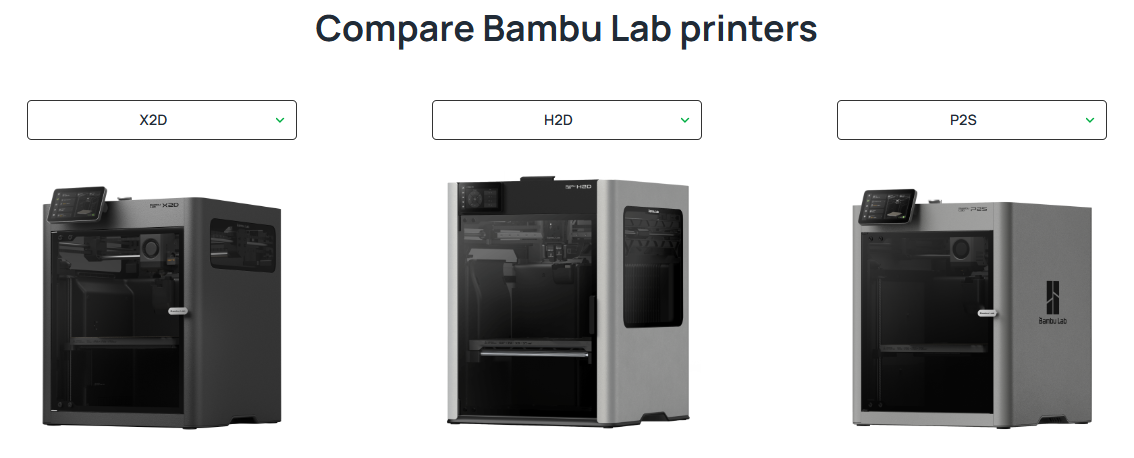
The Bambu Lab X2D and H2D are the two most powerful printers in Bambu's 2026 lineup. They share a lot of DNA — dual extrusion, enclosed chambers, engineering material support — but they are aimed at very different users.
The X2D starts at $649. The H2D starts at $1,899. That $1,250 gap needs to be justified by real capability differences, not marketing. Here's exactly what you get for the money.
Price
| Printer | Base Price | With AMS Combo |
|---|---|---|
| Bambu Lab X2D | $649 | $899 |
| Bambu Lab H2D | $1,899 | significantly more |
The X2D Combo with AMS2 Pro costs $899. The H2D starts at $1,899 for the base machine — already $1,000 more than a fully loaded X2D. If you're considering this comparison seriously, you're likely deciding whether the H2D's unique capabilities justify that gap.
Build Volume: The Biggest Difference
This is where the H2D separates itself most clearly.
| Printer | Build Volume |
|---|---|
| Bambu Lab H2D | 350 × 320 × 325mm |
| Bambu Lab X2D | 256 × 256 × 260mm |
The H2D offers roughly 2× the print volume of the X2D. That extra space matters for:
- Large cosplay pieces, helmets, and armour that would otherwise need to be split and glued
- Long functional parts like shelf brackets, enclosure panels, or vehicle components
- Batch printing multiple parts simultaneously to maximise throughput
- Artistic prints and sculptures that benefit from height
If your projects consistently push against the X2D's 256mm limits, the H2D solves that problem. If they don't, you're paying $1,000 extra for space you'll never use.
Speed
Both are fast, but the H2D has a slight edge:
| Printer | Max Speed |
|---|---|
| Bambu Lab H2D | 600mm/s |
| Bambu Lab X2D | 500mm/s |
In practice, printing at 600mm/s vs 500mm/s on a complex model makes a modest difference to total print time. This alone does not justify the price gap.
Dual Extrusion: Both Have It
Both the X2D and H2D feature dual extrusion — two independent nozzles that can each carry a different filament. This enables:
- Soluble supports using BVOH or PVA that dissolve in water — critical for complex functional parts
- True two-material printing within a single layer
- Multi-color printing when combined with an AMS system
The H2D's dual nozzle system uses dual direct drive for both hotends. The X2D's second nozzle uses a Bowden feed, which caps its speed at around 200mm/s. For most printing scenarios this difference is negligible, but it matters for users pushing edge cases with the secondary nozzle.
The H2D's Unique Features
Beyond build volume and speed, the H2D adds capabilities the X2D simply doesn't have.
Optional Laser Engraving
The H2D accepts optional laser modules — a 10W engraver for wood, leather, and fabric, and a 40W cutter for thicker materials. This turns the H2D into a hybrid machine: 3D printer by day, laser cutter when you need it. The laser combo version reaches $3,499 fully equipped.
For users who want both capabilities in one machine without buying separate hardware, this is genuinely compelling. For everyone else, it's irrelevant.
AI Nozzle Camera
The H2D includes a camera mounted directly at the nozzle that monitors extrusion in real time using AI. It can detect clogs, under-extrusion, and anomalies as they happen and alert you — or pause the print — before a failure ruins hours of work.
The X2D has LiDAR for first-layer inspection, which is excellent. The H2D's nozzle camera adds a continuous monitoring layer throughout the entire print.
BirdsEye Top Camera
A top-mounted overview camera lets you visually verify print alignment, monitor progress remotely, and catch visual failures from overhead. Useful for anyone running the printer remotely or managing multiple machines.
Materials
Both printers support an identical engineering material list: PLA, PLA+, PETG, ABS, ASA, TPU, PA, PA-CF, PC, and PET-CF. The H2D additionally supports PPA-CF — Polyphthalamide carbon fibre composite — which is a high-performance engineering material used in demanding industrial applications.
For most users, PPA-CF is irrelevant. For those who need it, only the H2D delivers it.
Who Should Buy the X2D?
The X2D at $649 (or $899 Combo) is the right choice if:
- Your prints fit within a 256mm cube — which covers the vast majority of hobby and prosumer projects
- You need dual extrusion and soluble supports without paying H2D prices
- You're upgrading from the X1 Carbon and want a direct successor
- You print demanding materials like PA-CF, PC, or ABS regularly and want LiDAR precision
- Budget is a meaningful consideration
Who Should Buy the H2D?
The H2D at $1,899 is the right choice if:
- You regularly print objects larger than 256mm in any dimension
- You want laser engraving/cutting capability in the same machine
- You're running the printer professionally or near-continuously and the AI monitoring adds real value
- PPA-CF support matters for your application
- You want the absolute best Bambu Lab offers and budget is secondary
Quick Comparison
| Bambu Lab X2D | Bambu Lab H2D | |
|---|---|---|
| Base price | $649 | $1,899 |
| Build volume | 256×256×260mm | 350×320×325mm |
| Max speed | 500mm/s | 600mm/s |
| Dual extrusion | ✓ | ✓ |
| LiDAR | ✓ | ✗ |
| AI nozzle camera | ✗ | ✓ |
| Laser module option | ✗ | ✓ |
| PPA-CF support | ✗ | ✓ |
| Difficulty | Beginner | Beginner |
The Bottom Line
For most people who are comparing these two, the X2D is the right answer. It delivers the core X2D-class experience — dual extrusion, soluble supports, LiDAR, engineering material support — at less than half the H2D's price.
The H2D earns its $1,899 price tag for a specific user: someone who genuinely needs the larger build volume, wants the laser option, or is running a professional operation where the AI monitoring and PPA-CF capability matter. That's a real audience — but it's a smaller one.
If you're unsure which Bambu Lab printer fits your needs, take our printer quiz for a personalised recommendation based on your budget and actual use case.
FAQ
Is the H2D worth $1,250 more than the X2D Combo?
Only for specific use cases. If you need prints larger than 256mm, want laser engraving capability, or are running a professional setup where AI print monitoring saves real money in failed prints — yes. For most hobbyists and prosumers, the X2D delivers 90% of the capability at less than half the price.
Does the X2D have the same dual extrusion as the H2D?
Both have dual extrusion capable of soluble supports and two-material printing. The H2D uses dual direct drive for both nozzles. The X2D's second nozzle uses a Bowden feed, limiting it to around 200mm/s on the secondary material. For most print scenarios this difference is minimal.
Can the X2D print as large as the H2D?
No. The X2D is limited to 256×256×260mm. If your project exceeds 256mm in any direction, you'll need to split it and join the pieces — or buy the H2D.
Is the H2D's laser module worth it?
If you currently own a separate laser engraver and want to consolidate machines, or if you've been considering adding laser capability to your workshop, the H2D laser bundle is competitively priced against standalone laser cutters. If laser engraving isn't part of your workflow, skip it entirely.
Which Bambu Lab printer is best for engineering materials?
Both the X2D and H2D handle the full range of engineering filaments reliably. The H2D additionally supports PPA-CF. For PA-CF, PC, ABS, and ASA — which cover 99% of engineering use cases — the X2D performs equally well at a much lower price.
Not sure which printer to buy?
Take our 2-minute quiz and get a personalised recommendation.
Find my printer →